

Forum Replies Created
- AuthorPosts
 responsive-museKeymaster
Our widgets are made to work with responsive versions, but adaptative ones should work too (maybe with a little tweaks).
Can you provide us an URL please?
responsive-museKeymasterI’m afraid this is not possible. You can change the colour but not the size.
responsive-museKeymasterHere you can preview some new design options that you can find in our updated Muse Online Shop Widget.
responsive-museKeymasterThe Jube template is free. No fees will be applied now nor in the future 😉
Regards,
responsive-museKeymasterTo add multiple recipients you should separate multiple senders by comma.
Regards,
responsive-museKeymasterUnfortunately, hover animations can’t animate text and it will only work with images for the mean time. Hopefully Adobe Muse will allow us to introduce this as a future update.
responsive-museKeymasterSure, please, check this video (its 3on1 tutorial but it will help
you)responsive-museKeymasterThis is a tutorial of the Youtube background widget that you can find in the same download page:
responsive-museKeymasterYes it does!
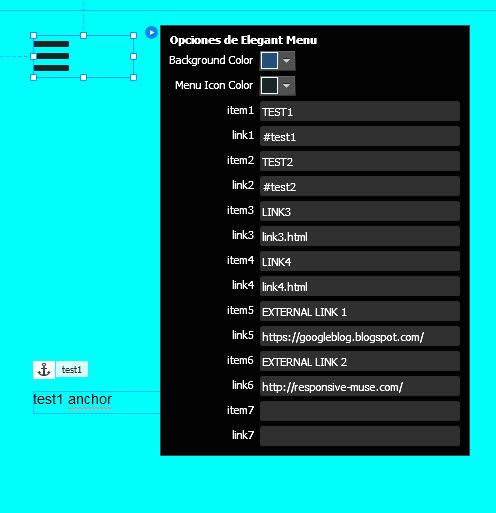
Here is an example on how to use it.
First 2 links, TEST1 and TEST2, are linked to anchor text.
Setup in widget settings would require something like #test1 #test2 (it needs to be same name than your anchor names with # symbol before)
 responsive-museKeymaster
Here are some tips to avoid this:
Do not add your widgets to master page.
Instead add the widget on every page you need it. Master page elements seems to stay in background when showing in your secondary pages.Use Adobe Muse layers.
When designing your muse page, make widgets appear in your first layer, put rest of the content in different ones.Use “Bring to Front and Send to Back”.
Right click your Adobe Muse elements and send back desired items (sometimes it requires pressing it a lot of times) and/or send to front widgets.responsive-museKeymasterHello!
Sorry, it seems Adobe Muse keeps removing leading zeros.
Can you download again?
We added this option:
UPDATE V2: now you can set up to 2 decimals in the price and force Adobe Muse to show leading zeros. Just use included widget museshop-product-with-leading-zeros.mulib
Thank you!
responsive-museKeymasterHello again!
We just updated widget, now you can set up to 2 decimals in the price.
You can download it again under “my account” menu.
Kind regards.
responsive-museKeymasterHi Ayse,
We will include the feature that you are asking for in an update very soon. We will let you know whenever it’s done for you to download again as we provide free updates forever.
Regards,
responsive-museKeymasterHello!
There are two libraries in current Muse: Library and widget library. All third party widgets are in the Library.
Can you please check if Widget is there?responsive-museKeymasterHello.
It is not possible at this moment to add multiple file attachments, but we note it down for a future update.
Thank you.
Kind regards.
- AuthorPosts

