
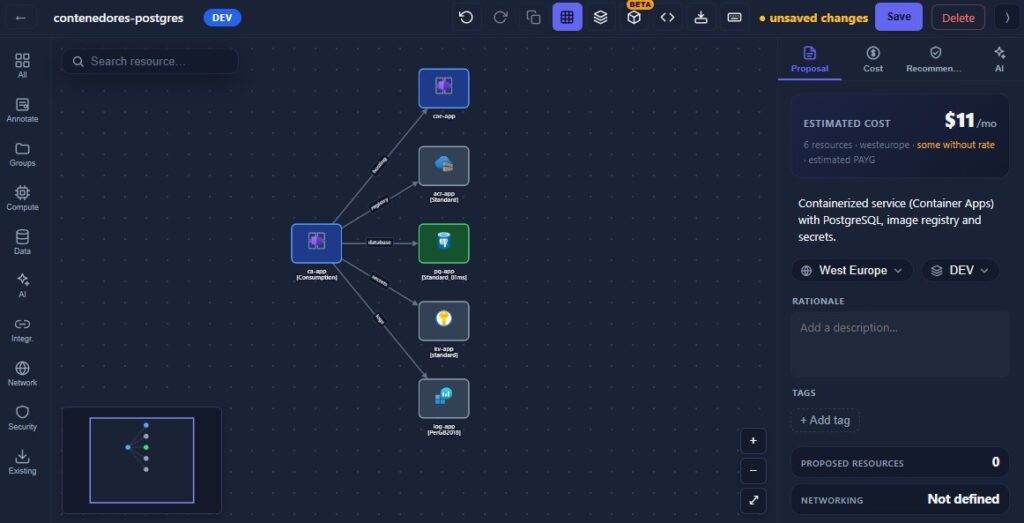
Almost every Azure project starts the same way: someone opens a diagramming tool and sketches the boxes — an App Service here, a SQL database there, a VNet wrapping the lot. The diagram gets pasted into a design doc, approved, and then quietly abandoned. The real infrastructure is written separately in Bicep or Terraform, and from that moment the picture and the deployment drift apart. Six months later the diagram is a lie and nobody trusts it.
This is the design-to-deploy gap, and it costs more than most teams admit: onboarding engineers learn an architecture that no longer exists, security reviews are done against a fiction, and every “can you send me an up-to-date diagram?” turns into an afternoon of archaeology. Here’s a practical way to close it.
Why the gap opens
The gap isn’t a discipline problem — it’s a tooling problem. Diagrams and infrastructure-as-code live in two different worlds that don’t talk to each other:
- Diagrams are pictures. Most diagramming tools export PNG or SVG. The shapes carry no meaning a machine can act on — a “database” box is just a rectangle with a label.
- IaC is text. Bicep, Terraform and ARM describe the same architecture precisely, but they’re hard to read at a glance and nobody reviews a 400-line template to understand the shape of a system.
Because there’s no bridge, keeping both in sync means doing the same work twice, by hand, forever. Teams don’t skip the diagram because they’re lazy; they skip it because maintaining two sources of truth is irrational.
Principle: one artifact, two views
The fix is to stop treating the diagram and the code as separate deliverables and start treating them as two views of one model. The diagram is the human-readable view; the IaC is the machine-readable view. If they come from the same source, they can’t drift.
There are two ways to get there:
- Code-first, diagram-generated. Write the IaC, then generate a diagram from it. Tools that parse Terraform state or Azure Resource Manager can produce a picture automatically. The upside is accuracy; the downside is that the generated layout is often unreadable, and you can’t use it to design — you can only document what already exists.
- Diagram-first, code-generated. Design visually, then export the diagram to deployable IaC. This keeps the design loop fast (you sketch, you discuss, you rearrange) and still ends with real code. The catch is that very few tools can actually do it — most stop at the picture.
Neither is strictly better; they suit different moments. Code-first fits documenting a mature system. Diagram-first fits the design phase, where you want to move boxes around in a review before anyone commits to a template.
A diagram-first workflow that stays honest
If you’re designing something new — or redesigning something old — here’s a workflow that keeps the picture and the deployment as one thing:
1. Draw with real resource types, not clip-art. Use a tool with the official Azure icon set and, more importantly, one where the shapes mean something — an App Service is an App Service, not a labelled rectangle. This is what makes the next step possible.
2. Group the way Azure groups. Put resources inside resource groups, VNets and subnets as real nested containers. This isn’t decoration: the nesting is structural information the code generator needs, and it’s also what makes the diagram read correctly to another Azure engineer.
3. Set the deployment details on the diagram. Region, tags, SKUs — capture them on the canvas rather than leaving them for “later in the Bicep.” Later never comes, and the diagram stays a wish instead of a spec.
4. Generate the code from the picture. This is the step that closes the gap. A tool that can generate Bicep, Terraform or ARM straight from the diagram turns the design into a deployable scaffold — dependencies wired up, names carried through — instead of a starting point you retype by hand. Treat the output as a strong scaffold, not a guarantee that every exotic resource round-trips untouched; unusual configurations still need a human finish.
5. Keep the diagram as the entry point. When the architecture changes, change the diagram and regenerate. The moment you edit the Bicep directly and skip the diagram, the gap reopens — so make the visual model the thing people reach for first.
What this buys you
- Onboarding that isn’t a lie. New engineers get a diagram that matches reality because reality was generated from it.
- Faster design reviews. Stakeholders argue over a picture, not a pull request full of HCL.
- A security and compliance surface people can see. It’s far easier to spot a database with a public endpoint on a diagram than in line 231 of a template.
- Less duplicated work. You maintain one model, not two.
Where it doesn’t apply
Be honest about the limits. If your infrastructure is enormous and already fully code-managed, a diagram-first flow won’t retrofit cleanly — generate diagrams from your existing IaC instead. And no generator handles every edge of Azure; the further you get from standard patterns, the more hand-finishing the exported code needs. The goal isn’t to eliminate IaC expertise — it’s to stop throwing away the design work you already did in the diagram.
The diagram and the deployment were always describing the same system. The only reason they drift is that we’ve treated them as two jobs. Close that gap — make one the source of the other — and the diagram stops being the first thing to go stale on a project and starts being the thing you actually trust.
